
 Home
Home  Apps
Apps  Games
Games  Windows
  Terms of Service
  Cookies & Privacy Policy
  About us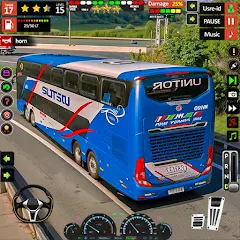
Bus Game Driver City Bus 3D

 /
/ 500,000+ Downloads
0.3 Version
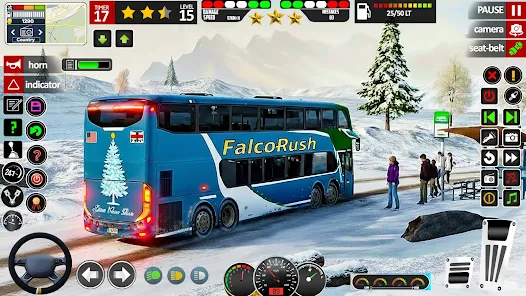
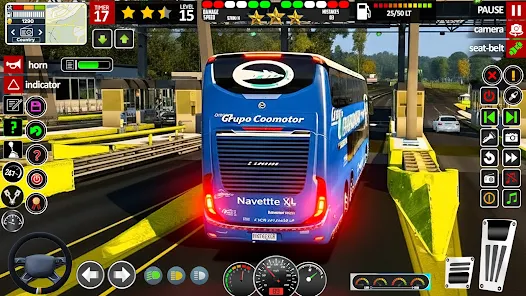
Information
- Category: Strategy
- Price: free
- Age Rating: Everyone
- Available on: /
- Developer: FalcoRush Games
- Updated on: May 8, 2026
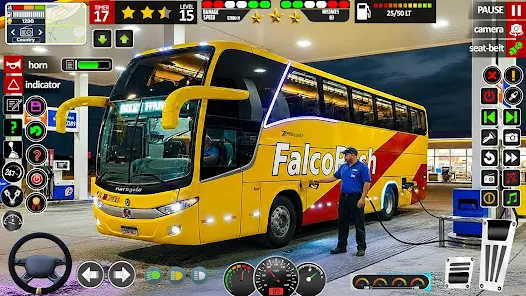
Experience the thrill of city driving with Bus Game Driver City Bus 3D! Step into the role of a professional bus driver as you navigate through bustling urban streets, pick up passengers, and complete challenging routes. With realistic graphics and immersive gameplay, you'll face traffic, weather conditions, and time constraints. Master your driving skills and become the ultimate city bus driver in this exciting simulation game. Get ready to hit the road and embark on your bus driving adventure!
Features & Highlights
Bus Game Driver City Bus 3D is an immersive simulation game that allows players to experience the life of a city bus driver. With its realistic graphics and engaging gameplay, it offers a unique blend of entertainment and education. Here are some of the core features that make this app stand out:
- Realistic Driving Mechanics: The game boasts highly detailed driving mechanics that mimic real-life bus operations. For instance, players must manage their speed, adhere to traffic rules, and navigate through busy city streets, providing a genuine driving experience.
- Diverse City Environments: Players can explore various city environments, each with its own unique challenges. Whether driving through bustling downtown areas or quieter suburban neighborhoods, the game keeps players engaged with its diverse settings.
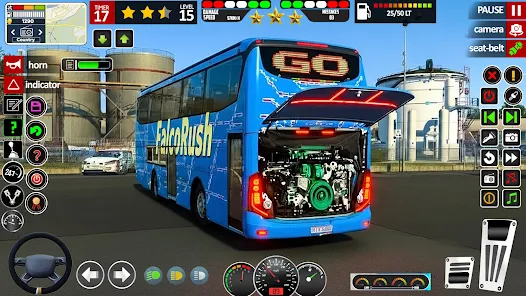
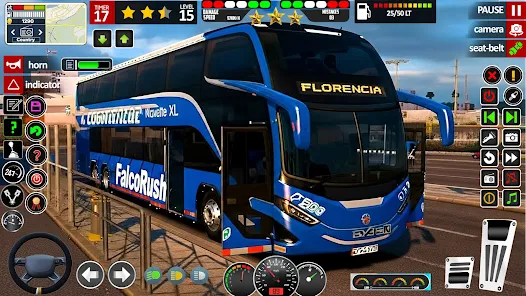
- Multiple Bus Models: The app features a variety of bus models, each with distinct characteristics. Players can choose from city buses, double-deckers, and more, allowing for a personalized driving experience that caters to different preferences.
- Challenging Missions: The game includes a series of missions that test players' driving skills. From picking up passengers at designated stops to completing routes within a time limit, these challenges add an exciting layer of gameplay.
- Customizable Controls: Users can customize their control settings to suit their preferences, whether they prefer tilt steering, touch controls, or a virtual steering wheel. This flexibility enhances the overall user experience, making it accessible for players of all skill levels.
Real Experience Using "Bus Game Driver City Bus 3D"
Application Scenarios
As a daily commuter, I often find myself navigating the busy streets of my city. One day, I decided to download Bus Game Driver City Bus 3D to see how well it could simulate my daily bus rides. The app allowed me to experience the challenges of being a bus driver, from managing passenger pickups to dealing with unpredictable traffic. I found myself in various scenarios, such as picking up a group of school children during rush hour or navigating through a construction zone, which made the gameplay feel incredibly realistic and relatable.
User Experience
The user interface of Bus Game Driver City Bus 3D is intuitive and user-friendly. Upon launching the app, I was greeted with a clean layout that made it easy to navigate through the different game modes and settings. The graphics are impressive, with detailed cityscapes and well-designed bus models that enhance the immersive experience. The feature workflow is seamless; I could easily switch between missions and customize my bus settings without any hiccups. Performance-wise, the app runs smoothly on my device, with minimal lag or crashes, allowing for an enjoyable gaming experience. Overall, I felt a sense of accomplishment after completing each mission, and the thrill of driving a bus in a virtual city was both entertaining and educational.
Pricing
Bus Game Driver City Bus 3D is available for free, which is a significant advantage for users looking for an engaging simulation game without any upfront costs. However, the app does offer in-app purchases for additional features and bus models, which can enhance the gameplay experience. The pricing is reasonable, and the option to play for free makes it accessible to a wider audience.
Updates & Support
The developers of Bus Game Driver City Bus 3D are committed to providing regular updates to enhance the user experience. I noticed that the app frequently receives new content, including additional missions and bus models, which keeps the gameplay fresh and exciting. Customer support is also readily available through the app, with a dedicated help section that addresses common issues and provides assistance for users who may encounter problems. This level of support adds to the overall positive experience of using the app.
Security & Privacy Review
When it comes to security and privacy, Bus Game Driver City Bus 3D takes several measures to protect its users. The app is available on both the App Store and Google Play, ensuring that it meets the security standards set by these platforms. During the registration process, users are required to provide minimal personal data, which is a plus for those concerned about privacy. The app does include ads, but they are not overly intrusive, and users have the option to purchase an ad-free experience. Additionally, the app does not engage in excessive tracking behavior, making it a safer choice for American users who prioritize their online privacy. Overall, I felt comfortable using the app, knowing that my personal information was handled responsibly.
Pros 
-
 Experience realistic driving physics for an authentic bus operation feel.
 - Enjoy stunning graphics that enhance the immersive city environment.
- Navigate diverse routes that challenge your driving skills and adaptability.
- Engage in various missions to earn rewards and unlock new buses.
- Customize your bus for a personalized driving experience tailored to your style.
Cons 
-
 Controls can feel unresponsive, making driving challenging for users.
 - Graphics may appear outdated, lacking modern visual appeal.
- Limited variety in missions can lead to repetitive gameplay experiences.
- AI behavior can be unrealistic, affecting overall immersion and enjoyment.
Get Installation Details  Google Play
  App Store
Google Play App Store User Reviews
 Moyo Josphat2026/02/24
can't play l don't know why
- Farhan Hashmi2026/03/08
best bus simulation game
- Kate McClintock2026/02/24

i am not a fan of bus games
- Sangam Singh2026/04/30
very nice game
- Vkjoki Bhai2026/04/02
kids enjoy sharing
Review Source: Google Play store public user reviews.
FAQ
Does Bus Game Driver City Bus 3D collect my personal data?
Bus Game Driver City Bus 3D may collect some non-personal data for analytics and to improve the gaming experience, but it typically does not require personal information for gameplay.
Does Bus Game Driver City Bus 3D offer a free trial or free version?
Yes, Bus Game Driver City Bus 3D usually offers a free version with optional in-app purchases, allowing users to experience the game before deciding to spend money.
Does Bus Game Driver City Bus 3D require an internet connection?
No, Bus Game Driver City Bus 3D can be played offline, although certain features or updates may require an internet connection.
How can I contact support or send feedback for Bus Game Driver City Bus 3D?
You can typically contact support or send feedback through the app's settings or help section, which may provide an email address or contact form for inquiries.
How do I manage or cancel my Bus Game Driver City Bus 3D subscription?
You can manage or cancel your subscription through the app store settings on your device, where you can view your subscriptions and make changes as needed.
How to use Bus Game Driver City Bus 3D
How can I contact customer service for the Bus Game Driver City Bus 3D app?
You can contact customer service through the app's settings or visit the official website for support options.
How do I log in to the Bus Game Driver City Bus 3D app?
To log in, open the app and enter your credentials on the login screen. If you don't have an account, you can create one.
Is there a way to activate features in the Bus Game Driver City Bus 3D app?
Features can be activated through in-app purchases or by completing specific game objectives. Check the app for details.
What is the customer service number for the Bus Game Driver City Bus 3D app?
The customer service number is typically found in the app's help section or on the official website.
Similar Games













You May Like

Cell Survivor
Snap Brain Games
4.4

Evo Defense: Merge TD
BLUE PLANET JOY
4.4

West Game II
LeyiGames
4.5

Warcodes - AI RPG Game
Cozy Orchards
3.2

Thrones of Destiny
Time Killers Studios
4.2
TABS Pocket Edition
Landfall Games
4.3

Over Hazed: Zombie Survival
Hour Games
4.1

Mobile Legends: Bang Bang.US
Skystone Games Pte. Ltd.
2.5

KR 2 - King Simulator PRO
Oxiwyle
4.0

Gangster Crime Mafia City Game
GameCraft Legends LLC

Fate War
IGG.COM
4.4

Chess Rumble: PVP Card Battle
GRAVITY Co., Ltd.
4.2