
 Home
Home  Apps
Apps  Games
Games  Windows
  Terms of Service
  Cookies & Privacy Policy
  About us
ShopSavvy - Barcode Scanner



Information
- Category: Shopping
- Price: free
- Age Rating: /
- Rating: 4.3
- Developer: ShopSavvy, Inc.
- Version: 16.8.4
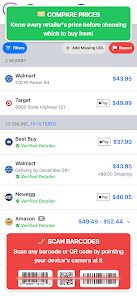
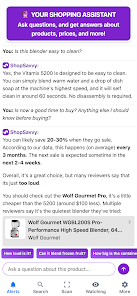
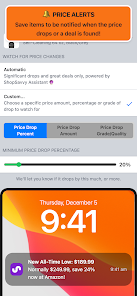
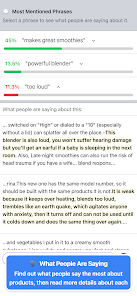
ShopSavvy - Barcode Scanner App is a mobile application that allows users to scan barcodes of products and compare prices from different retailers. It is available for both Android and iOS devices. The app also allows users to search for products by name or keyword, and provides detailed product information, including reviews, ratings, and product images. Additionally, users can save their favorite products and stores, and receive notifications when prices drop. ShopSavvy also offers a loyalty program, allowing users to earn rewards for shopping at participating stores. With ShopSavvy, users can save time and money by quickly finding the best deals on the products they need.
Features & Highlights
ShopSavvy - Barcode Scanner is not just your typical barcode scanning app; it’s a comprehensive shopping companion that offers a plethora of features designed to save you money and time. Here are some of the core features that make it stand out:
Real Experience Using ShopSavvy - Barcode Scanner
Application Scenarios
As someone who loves shopping smartly, I have integrated the ShopSavvy app into my everyday life. Whether I’m out grocery shopping, hunting for bargains at thrift stores, or browsing in a mall, this app is always at my fingertips. Just last week, I was at a local grocery store, and I found myself curious about the price differences between brands of organic pasta. With my phone, I quickly scanned the barcode of the more expensive brand, and ShopSavvy returned with a list of prices from nearby stores, highlighting an alternative brand that was cheaper and rated just as highly. This kind of scenario has become a routine in my life, helping me save money and make better choices.
User Experience
The user interface of ShopSavvy is intuitive and user-friendly. Upon launching the app, I’m greeted with a clean layout that makes scanning barcodes a breeze. The scan feature works exceptionally well; I’ve often found that it can read barcodes even in less-than-ideal lighting conditions. The workflow is smooth, and the app quickly compiles price comparisons, reviews, and alternative products. After using the app for several months, I feel confident navigating its features, and I appreciate how quickly it processes information. Overall, using ShopSavvy is a pleasant experience, and I often find myself recommending it to friends and family.
Pricing
ShopSavvy is free to download and use, which is a significant plus considering the vast array of features it offers. While there are optional in-app purchases available, I have found that the free version provides everything I need for effective price comparison and product research. This makes it accessible for all users, regardless of budget.
Updates & Support
The app receives regular updates, which improves functionality and adds new features. I’ve noticed enhancements in scanning speed and accuracy over the months. The support team is responsive; I once faced a minor glitch and received a prompt reply to my query, alongside a solution that resolved my issue quickly. This level of customer service is reassuring and adds to my overall satisfaction with the app.
Security & Privacy Review
When it comes to security and privacy, ShopSavvy takes user data protection seriously. The app is available on both the App Store and Google Play, adhering to the security standards set by these platforms. The registration process is straightforward and does not require extensive personal information, which is a relief for privacy-conscious users. The app does use ads, but they are not intrusive, and I have not noticed any aggressive tracking behaviors that compromise my privacy. Overall, I feel secure using ShopSavvy, knowing my information is handled responsibly.
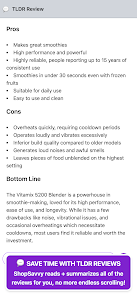
Pros 
-
 ShopSavvy offers unbeatable price comparisons
 - Easily scan barcodes for quick info
- Access user reviews to make informed choices
- Find local deals and discounts nearby
- Track prices over time to save money
Cons 
-
 Limited barcode database access
 - Inaccurate price comparisons
- Ads can be intrusive at times
- User interface feels outdated
Get Installation Details  Google Play
  App Store
Google Play App Store FAQ
What type of app is ShopSavvy - Barcode Scanner?
ShopSavvy is a barcode scanning app that helps users compare prices, find deals, and manage their shopping experiences.
How to use ShopSavvy - Barcode Scanner
How can I contact ShopSavvy customer service for assistance?
You can reach ShopSavvy customer service through the app's support section or by visiting their website for contact information.
How do I log in to my ShopSavvy account?
To log in, open the app and enter your registered email and password in the login section.
Is activation required for the ShopSavvy app?
No activation is required; you can start using the app immediately after downloading it.
What is the customer number for ShopSavvy support?
ShopSavvy does not have a specific customer number; support is primarily provided through the app and their website.
Similar Apps















You May Like

Wish
Shopping
4.8

eBay: The shopping marketplace
Shopping
4

Sam's Club
Shopping
4.1

Fetch: America’s Rewards App
Shopping
4.7

Best Buy: Shop tech deals
Shopping
4.7

Family Dollar
Shopping
3.7

My Bath & Body Works
Shopping
4.6

WinStamp Business
Shopping
3.7

Veebs
Shopping
1.9

TCTV: Trading Card TV
Shopping
4

PPP
Shopping
5

Inventory Bot
Shopping
4.4