
 Home
Home  Apps
Apps  Games
Games  Windows
  Terms of Service
  Cookies & Privacy Policy
  About us
SMART tag™ Parent App

 3.2
3.2 100,000+ Downloads
1.5.1 Version
Information
- Category: Education
- Price: free
- Age Rating: Everyone
- Available on: /
- Developer: SMART tag
- Updated on: Feb 14, 2026
Pros 
-
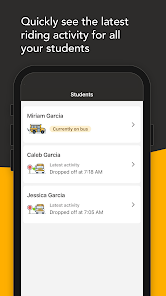
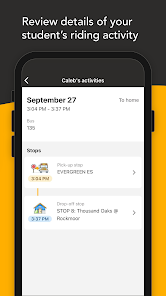
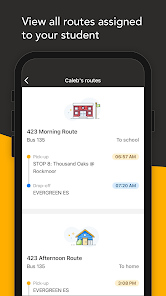
 Stay connected with your child’s activities
 - Receive real-time updates and alerts
- Access a user-friendly interface
- Monitor academic progress easily
- Engage with teachers and staff directly
Cons 
-
 Limited customization options
 - User interface can be confusing
- Notifications may be overwhelming
- Requires constant internet access
- Privacy concerns with data sharing
Get Installation Details  Google Play
  App Store
Google Play App Store User Reviews
(344 Reviews) Amanda Hill2024/11/19
It notifies fine, but when I go into the app it doesn't show my student. I can go into notifications and it will show drop off and pickup of him, but he isn't listed on the student part. Also trying to add my other kid since his school just got one and it just keeps spinning like it's loading, had to try multiple times, then it said it added him, but when you go into the account part it shows no kids linked. If I go out and back in sometimes it says kids linked. Won't change bus notify time
- Pua B2026/01/14
When the app is working, It's great! I get location accuracy as well as correct approx time arrival. But when it's not, it's bad. The location system needs to be fixed. It'll sometimes have my kids clear across town when they're already in the house. Or the bus will still say that it's at the depot when really it's around the corner. I think that once that's squared away, a lot of the reviews will be better.
- Alana Comeau2024/08/14
I much preferred the website; I could actually see where the bus was and how far it was from our stop. So far I have received one notification of what should have been six, and the app just does not load at all around pickup/dropoff time. If there's a "light version of the portal" coming, maybe that should have been finished and released before forcing everyone onto a non-functional app.
- Tony M (Froboy77)2024/12/13
Major downgrade from the previous system our school used. You cannot look at the map until you get a notification. The notification is sent based on the time the bus is expected to arrive. Too unpredictable. Would be nice if you could set a zone and when the bus passes that zone, you get a notification. Updated my review to lower the rating. Map function hasn't worked at all for several weeks.
- Michele Hicks2024/11/05
Now using the app, the map feature is gone. The web version allowed you to see the bus location while enroute. Why have this program if you can't see where the bus is located. Developers misses the boat on this one. This should have been an acceptance criteria before deployment. UPDATE 11/4 Developer pushes out a new update and the map only works at certain points. Seem silly that the bus can't be tracked all the way to school but us parents must rely on the notifications.
Review Source: Google Play store public user reviews.
How to use SMART tag™ Parent App
How can I contact customer service for the SMART tag™ Parent App?
You can reach customer service by visiting the official website and using the contact form or calling the provided customer support number.
How do I activate the SMART tag™ Parent App?
To activate, download the app, create an account, and follow the on-screen instructions to link your SMART tag™ device.
How do I log in to the SMART tag™ Parent App?
Open the app, enter your registered email and password, then tap 'Log In' to access your account.
What is the customer number for the SMART tag™ Parent App?
The customer number can typically be found on the app's official website or within the app's help section.
What's New
- General bug fixes and app improvements
Similar Apps















You May Like

Canvas Student
Instructure, Inc.
4.7

Starfall.com
Starfall Education Foundation
4.0

Moodle
Moodle Pty Ltd.
4.6

Planetary Hours
Broer Apps
4.4
Nibble: Your Bite of Knowledge
KREMITAL LIMITED
4.4
phyphox
RWTH Aachen University
4.8

Talkpal - AI Language Learning
Talkpal, Inc.
4.3

Nerd AI - Tutor & Math Helper
Deep Flow Apps
4.6

Language Learning - Ling
Ling Learn Languages
4.5

Luzia: Your AI Assistant
FACTORIA ELCANO SL
4.5

Turbo AI - Notetaker
Turbo AI
4.8

Schoox Classic
Schoox, Inc.
3.9