
 Home
Home  Apps
Apps  Games
Games  Windows
  Terms of Service
  Cookies & Privacy Policy
  About us
Ring - Always Home

 4.6
4.6 10,000,000+ Downloads
3.93.1 Version
Information
- Category: Lifestyle
- Price: free
- Age Rating: Everyone
- Available on: /
- Developer: Ring.com
- Updated on: Jul 2, 2026
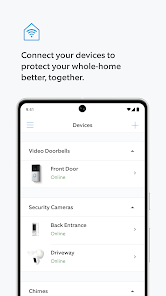
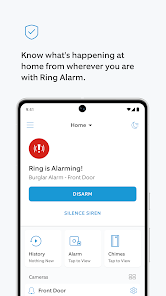
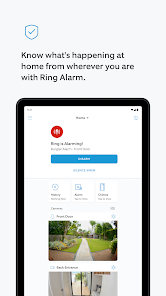
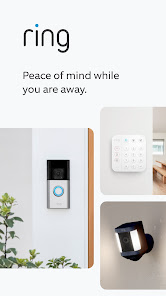
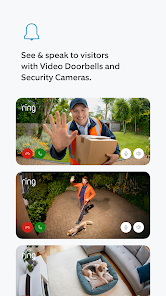
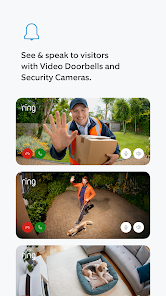
The Ring - Always Home App enhances your home security experience by allowing you to monitor and control your Ring devices from anywhere. With real-time notifications, live video streaming, and easy access to your security settings, you can stay connected to your home at all times. Whether you're at work or on vacation, the Always Home App ensures peace of mind, empowering you to protect what matters most with just a few taps on your smartphone.
Features & Highlights
The "Ring - Always Home" app is designed to enhance your home security experience, providing users with a range of features that make monitoring your property easier and more efficient. Here are some of the core features that stand out:
- Live Video Streaming: This feature allows users to view real-time video feeds from their Ring cameras. Imagine being at work and receiving a notification of movement at your front door; you can instantly check the live feed to see who is there, ensuring you never miss a visitor.
- Two-Way Audio: With this feature, you can communicate with visitors or delivery personnel directly through the app. For instance, if a package is delivered while you’re out, you can instruct the delivery person to leave it in a safe spot, all from your smartphone.
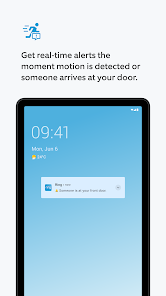
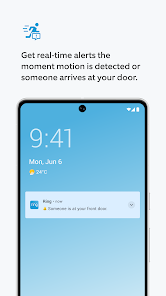
- Motion Alerts: The app sends instant notifications when motion is detected, allowing you to stay informed about any activity around your home. Picture this: you’re on vacation, and you receive an alert about movement in your backyard. You can quickly check the camera and ensure everything is secure.
- Integration with Smart Home Devices: The app seamlessly integrates with various smart home devices, enhancing your home automation experience. For example, you can set your Ring camera to trigger your smart lights when motion is detected, illuminating your property and deterring potential intruders.
- Cloud Video Storage: Users can store recorded footage in the cloud, making it easy to review past events. If you need to check what happened during a specific time frame, you can access the footage from anywhere, providing peace of mind and security.
Real Experience Using "Ring - Always Home"
Application Scenarios
As a busy professional, I often find myself juggling work commitments and personal responsibilities. The "Ring - Always Home" app has become an essential tool in my daily life. For instance, I frequently receive packages while I’m at the office. With the app, I can monitor my front porch in real-time, ensuring that my deliveries are safe and secure. Additionally, I have a pet that loves to roam the backyard. The motion alerts keep me informed about any activity, allowing me to check in on my furry friend while I’m away.
User Experience
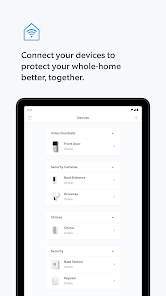
The user interface of the "Ring - Always Home" app is intuitive and user-friendly. Upon opening the app, I am greeted with a clean dashboard that displays all my connected devices. Navigating through the features is seamless, whether I’m checking live feeds or reviewing recorded footage. The performance is impressive; the video quality is crisp, and the two-way audio feature works flawlessly. Overall, my experience has been positive, as the app provides a sense of security and control over my home environment.
Pricing
The "Ring - Always Home" app is free to download, but to unlock its full potential, users may need to subscribe to a Ring Protect plan. The pricing for these plans varies, offering options for cloud storage and additional features. The investment is worthwhile for anyone serious about home security, as it provides peace of mind and comprehensive monitoring capabilities.
Updates & Support
Ring regularly updates the app to enhance functionality and address any bugs. The support team is responsive and helpful, providing assistance through various channels, including live chat and email. I’ve found their customer service to be reliable, which is crucial when dealing with security-related concerns.
Security & Privacy Review
When it comes to security and privacy, the "Ring - Always Home" app takes several measures to protect its users. Available on both the App Store and Google Play, the app requires users to create an account, which involves providing personal information such as an email address and phone number. This data is essential for account verification and security notifications.
One concern for American users is the app's data collection practices. While Ring does not display ads within the app, it does track user behavior to improve its services. Users should be aware of the privacy settings available within the app, allowing them to manage what data is shared. Overall, while the app offers robust security features, users must remain vigilant about their privacy settings to ensure their personal information is protected.
Pros 
-
 Enhanced home security with real-time monitoring
 - Remote access allows control from anywhere
- Easy integration with existing smart home devices
- User-friendly app for effortless management
- Compact design fits seamlessly in any space
Cons 
-
 Limited battery life affects usability during outages
 - Privacy concerns with constant surveillance capabilities
- Requires stable Wi-Fi for optimal performance
- High cost compared to traditional security options
Get Installation Details  Google Play
  App Store
Google Play App Store User Reviews
(544K Reviews) Drake Larsen2026/02/12
go with a different company, for cameras, doorbells and security. This has been problems for the whole 5 years I've had it. never works when it's needed. always slow and behind. video quality? never heard of him. I had three packages taken off my porch did it video any of them? no it did not. but you can bet your bottom dollar that it will record EVERY car that drives by. nevermind all the features to specify what movement should be ignored, when it should record and notify, none of that works.
- Alaina George2024/10/02
Overall this camera does what it says. We haven't had problems with it missing people directly on our porch. However there are so many missed events, the notifications are very delayed, and the camera quality is pretty poor when zooming in especially. It misses things that aren't that far away like a car pulling into the end of my driveway and doesnt notify us until a minute after the doorbell rings. Overall, good not great and we're looking for other options.
- Jonathan Nelson2025/01/19
App is super glitchy. When you delete a video, instead of going to the previous video or the next video, it jumps to the very beginning of that day. If you delete another video, it jumps to the beginning of the PREVIOUS day. I then have to go through an entire day's worth of videos to get caught up to current again. Hate this app and only use it because I don't have a choice. Considering switching to a different video doorbell altogether just because of the horrible user interface.
- Kyle McKeon2024/12/16
For the most part RING has been a good security/camera system. The new updates made the RING app so much better. So when this new update came out, myself & lots others here in the reviews we're thinking it was going to be great. RING might as well built a time machine to go back to 2019. They removed so many features & Geo fencing isn't recognizing me anymore. I also upgraded my yearly subscription so I'm paying twice more for 24/7 recording, but the app did not update to this new 24/7 feature.
- Andrea Burkenstock2025/07/15
App worked great till a couple months ago. Now notifications are pointless if they even come through timely. The doorbell ring no longer works as a notification on the phone, only through the doorbell itself, there is no longer a video preview, the app does not open when you click on the notification, and on the rare occasion that it does open it brings you to a whole new live view rather than the footage it notified you about. The app has become pointless for notifications.
Review Source: Google Play store public user reviews.
FAQ
Does Ring - Always Home collect my personal data?
Yes, Ring - Always Home may collect personal data such as your account information, device data, and usage information, as outlined in their privacy policy.
Does Ring - Always Home offer a free trial or free version?
Ring - Always Home does not offer a free version, but it may provide a limited-time free trial for certain subscription features depending on promotional offers.
Does Ring - Always Home require an internet connection?
Yes, Ring - Always Home requires a stable internet connection to function properly, as it relies on cloud services to stream video and send alerts.
How can I contact support or send feedback for Ring - Always Home?
You can contact support for Ring - Always Home through the app, by visiting the Ring website, or by calling their customer service hotline for assistance and to send feedback.
How do I manage or cancel my Ring - Always Home subscription?
You can manage or cancel your Ring - Always Home subscription through the app settings under the subscription section, or by visiting the Ring website and accessing your account.
How to use Ring - Always Home
How can I contact Customer Service for the Ring - Always Home app?
You can contact Ring Customer Service through the app or by visiting their website. They provide support via chat, email, or phone.
How do I activate the Ring - Always Home app?
Download the app, create an account or log in, then follow the prompts to set up your device. Ensure you have an active internet connection.
How do I log in to the Ring - Always Home app?
Open the app, enter your email and password associated with your Ring account, and tap 'Log In.'
What is the Customer Number for the Ring - Always Home app?
The Customer Number can be found in the app under settings or on the Ring website. It may vary by account.
What's New
- Enjoy a fresh new Ring app update, including bug fixes and improvements.By using this app, you agree to Ring’s Terms of Service (ring.com/terms). You can find Ring’s privacy notice at ring.com/privacy-notice.
Similar Apps
















You May Like

Substack
Substack Inc.
4.8

Vivint
Vivint Home
4.3
Hubspace
Afero
4.7

ecobee
ecobee inc.
4.3

Uniee: Easy Chat & Local Date
UltraMatrix Limited
4.3

Happy New Year Wallpaper 2026
AlHai Softs

Spirit Box: Ghost's Whispers
Eritron
4.0
Merge Labs NRW2
Merge Labs
4.7

Liven: Discover yourself
LivenTech
4.3

Gaia: Streaming Consciousness
Gaia, Inc.
4.6
Back to the Future WatchFace
Michael T.

Aveola: Random Live Video Chat
Pepitama Ltd
4.1