
 Home
Home  Apps
Apps  Games
Games  Windows
  Terms of Service
  Cookies & Privacy Policy
  About us
Diary Pro - Diary With Lock

 4.0
4.0 1,000,000+ Downloads
1.0.5 Version
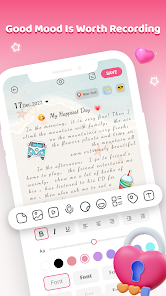
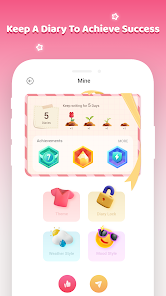
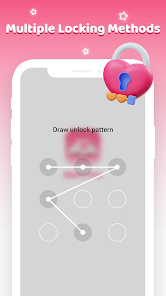
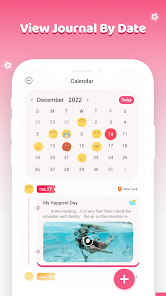
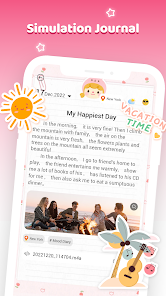
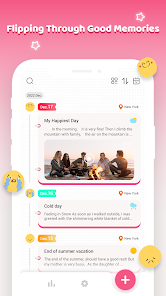
Information
- Category: Lifestyle
- Price: free
- Age Rating: Everyone
- Available on: /
- Developer: RHEANNA LYNN
- Updated on: Feb 14, 2025
Pros 
-
 Experience ultimate privacy
 - Secure your thoughts with a lock
- Easily organize your entries
- Customize themes for a personal touch
- Access from any device, anytime
Cons 
-
 Limited customization options
 - Syncing issues with devices
- No cloud backup feature
- User interface can be clunky
- Lack of export functionality
Get Installation Details  Google Play
  App Store
Google Play App Store User Reviews
(2.5K Reviews) Ashley Ashworth2025/09/10
First off, like 95% of the app is locked behind ads. They are short ads, but still very annoying. Secondly, this "journaling" app is so unrealistic. You can add emotions to your days, but the stationery and stickers are all overly happy and just full of sunshine and rainbows. We can't be like that everyday, so get ready to have some boring looking journals pages or have everything conflicting. Wanted this to be more than what I got.
- Jentry Williams2025/10/29
DO NOT USE UNLESS YOU WANT TO GO CRAZY! For months I couldn't figure out which app was popping up ads while using other apps, it was driving me crazy! I checked for adware and malware, anything you could think of and nothing. FINALLY! today I caught the ad and opened up where you can see all the apps you have open and I caught this app logo! Uninstalled immediately. 0 ⭐!
- Skylar Flake2025/10/05
I downloaded this app but haven't gotten around to trying it out yet. And now I never will. The app OPENS ITSELF with a nice giant ad while I'm using OTHER apps. It will disturb whatever I'm doing in another app, open randomly, and switch me over to that app instead of the one I'm using. Absolutely not okay. I could not uninstall fast enough.
- Tracy Stewart2025/10/09
I downloaded this app, and haven't had a chance to open it yet. but it keeps opening by its self while im in other apps and I keep getting ads. please don't download this app unless you want to get ads every few minutes on other apps.
- Britta Daniels2025/07/30
!!! only 5 stars to get shown!!! dont download! I opened it to an ad got out of ad just to click first entry and another add got out that clicked first answer and into a 3 add I spent more time on ads then in the app deleted immediately
Review Source: Google Play store public user reviews.
FAQ
Can I submit suggestions or feedback to Diary Pro - Diary With Lock?
Yes, users can submit feedback through the app's support section.
Does Diary Pro - Diary With Lock collect my personal data?
No, Diary Pro prioritizes user privacy and does not collect personal data.
Does Diary Pro - Diary With Lock support offline use?
Yes, Diary Pro can be used offline, allowing you to write anytime.
How do I cancel my Diary Pro - Diary With Lock subscription?
You can cancel your subscription through your app store account settings.
How much does a subscription to Diary Pro - Diary With Lock cost?
The subscription cost varies; check the app for current pricing details.
How to use Diary Pro - Diary With Lock
How can I contact customer service for Diary Pro?
You can reach customer service through the app's settings or visit the official website for support options.
How do I log in to my Diary Pro account?
Open the app and enter your registered email and password on the login screen.
Is there a way to activate Diary Pro after purchase?
Yes, simply enter your activation code in the app's settings under the 'Activate' section.
What is the customer number for Diary Pro?
The customer number is typically found in the app's support section or on the official website.
Similar Apps
















You May Like

Substack
Substack Inc.
4.8

Ring - Always Home
Ring.com
4.6

Vivint
Vivint Home
4.3

Hubspace
Afero
4.7

ecobee
ecobee inc.
4.3

Uniee: Easy Chat & Local Date
UltraMatrix Limited
4.3

Happy New Year Wallpaper 2026
AlHai Softs

Spirit Box: Ghost's Whispers
Eritron
4.0
Merge Labs NRW2
Merge Labs
4.7

Liven: Discover yourself
LivenTech
4.3

Gaia: Streaming Consciousness
Gaia, Inc.
4.6
Back to the Future WatchFace
Michael T.